


Home Inventory & Food: InvenDo
4.7164.00 Reviews
App Specs
- Version
- 1.0.4
- Updated On
- License
- Free
- Downloads
- 50,000+
- Developer
- Chester Software (Xaltos Technologies Ltd)
- Categories
- House & Home
- Platform
- Android
Screenshots
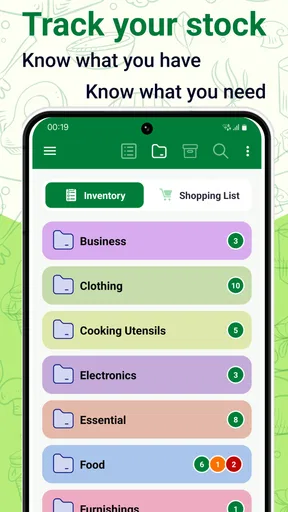
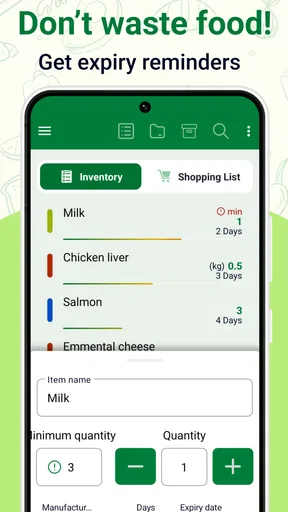
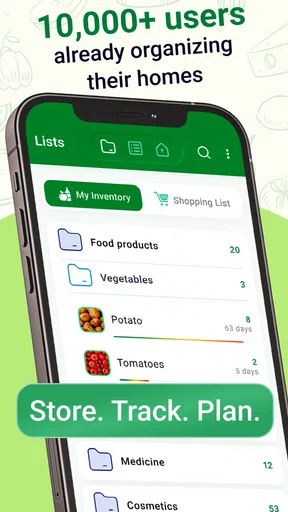
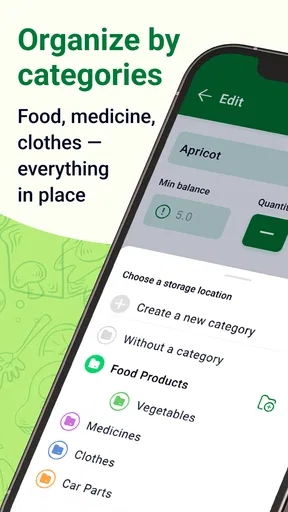
 Analysis by AppCompare
For me, a home inventory app earns its place when it prevents a small, repeated annoyance: buying something I already own, forgetting food until it expires, or making a shopping trip without the one item I actually needed. Home Inventory & Food: InvenDo is built around those everyday jobs, bringing household stock, expiry tracking, and shopping plans into one place. That focus is useful, but it also means the app works best when I’m willing to keep its records current. It can help me stay organized; it cannot do the remembering for me.
A practical role between pantry and shopping list
InvenDo is a free house-and-home app from Chester Software, part of Xaltos Technologies Ltd. It has a 4.7 average from around 1,400 ratings and more than 50,000 installs, which suggests that this kind of home-management tool has found an audience. The app is rated for Everyone, runs on Android 6.0 and later, and its current version is 1.0.4. Optional in-app purchases range from $1.99 to $74.99 per item, so I’d check the purchase options in the app before relying on paid capabilities.
The basic appeal is easy to understand: keep a record of what’s at home, use dates to make perishable items easier to manage, and turn gaps into a list for the next shop. That can be more useful than maintaining separate notes for pantry contents and groceries, especially if more than one person is involved. Still, the benefit depends on how much detail you want to record. A quick list of staples takes little effort; a thorough inventory of every cupboard takes more ongoing attention.
Where InvenDo helps in everyday use
First things first, downloading and setting up InvenDo is a breeze. Available on both Android and iOS, the app is just a quick install away from transforming how you handle inventory. Once you've got it on your device, you'll be greeted with a slick, user-friendly interface that's intuitive enough for even the least tech-savvy among us.
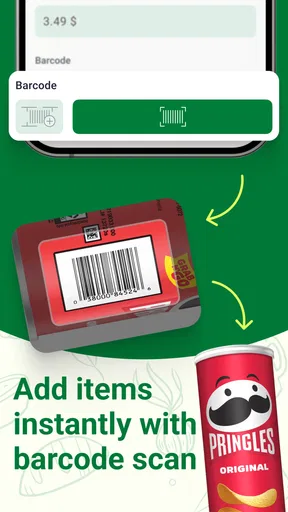
Upon opening the app, the setup wizard walks you through adding your first few items. You can categorize them by room or type, making it super easy to find what you’re looking for later on. The app also allows you to scan barcodes, which is a real time-saver when adding multiple products.
Making an inventory you can actually maintain
One of the standout features of InvenDo is its barcode scanning capability. This isn't just a gimmick; it's a massive convenience for quickly adding and updating your inventory. I found that I could scan an entire shopping haul in minutes, and the app automatically categorizes everything for me.
Another impressive feature is the expiry date tracking. You can set reminders for when items are getting close to their expiration, which is perfect for avoiding food waste. Trust me, you’ll appreciate this feature when it saves you from discovering a stinky surprise in the back of your fridge.
Worth Reading Before You Choose

Flipboard Shows What News Apps Must Do Beyond the Feed

Switching to Android Auto Means Rethinking Your Driving Routine

Google Calendar Makes a Crowded Week Easier to Manage

Ludo King Makes the Most of the Minutes Between Plans

Baby Panda World Brings Quick Play to Modern Phones, but Its Game Library Feels Busy

ESPN’s Live Game View Makes Following Close Games Easier
For a household that buys the same packaged staples repeatedly, scanning can make a restock routine feel less like clerical work. I’d still check each entry as I add it: packaging changes, similar products can be easy to confuse, and a quick scan is only helpful if the record matches what’s actually in the bag. For fresh produce or leftovers without a convenient barcode, manual entry is the more realistic route. That trade-off is worth considering before expecting a complete inventory to appear automatically.
Expiry dates are most useful when I treat them as prompts to plan, not as a guarantee that food is safe or unsafe on a particular day. I’d enter dates while putting groceries away, then use the approaching dates to decide what to cook first. This small habit is more reliable than trying to reconstruct a fridge full of purchases later. It also makes the feature useful for households with several open or partly used ingredients, where remembering what should be used soon can be harder than remembering what was bought.
Shopping lists that support a household routine
InvenDo also excels in managing grocery lists. You can create multiple lists for different stores or occasions, and the app will even suggest items based on your past purchases. It’s like having a personal shopping assistant that remembers your preferences.
One feature I particularly love is the ability to share lists with family members. No more texting back and forth about what you need from the store—just update the list in the app, and everyone’s on the same page. It’s a lifesaver for busy households.
A realistic way I’d use this is to keep a regular grocery list for weekly basics and a separate one for a planned meal or a particular errand. Before leaving, I’d compare the list with the inventory rather than simply adding every item I can think of. If I notice that the household already has enough of a staple, I can leave it off; if a date is approaching, I can choose a meal that uses it. That turns the app’s different jobs into one simple routine instead of three disconnected chores.
Shared lists are especially helpful when one person notices a shortage at home and another is already heading to the shop. The practical advantage is fewer duplicate messages and less dependence on one person remembering every item. The limitation is that a shared list only stays dependable if everyone checks it and marks changes consistently. If one person keeps adding items while another relies on memory, no app can fully prevent crossed wires. I’d agree on a simple household habit—add an item when it runs low, then remove or update it when it’s bought.
Categories, flexibility, and the effort they require
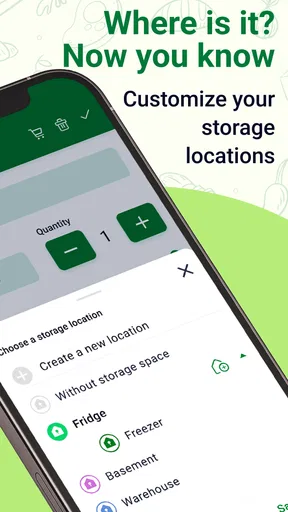
Customization is key with InvenDo. You can tailor the categories to fit your needs, whether you’re tracking food, toiletries, or cleaning supplies. The app is designed to be flexible, adapting to whatever inventory you need to manage.
Usability-wise, the app runs smoothly, with minimal lag. The developers have clearly put a lot of thought into the user experience. The icons and navigation are clear, making it easy to find the features you need without any fuss.
That flexibility suggests a useful approach: start with the items that cause genuine repeat problems, such as costly pantry staples, freezer food, or household supplies that are easy to run out of unexpectedly. I wouldn’t begin by cataloguing every object in every room. A smaller, accurate list is more valuable than a sprawling one that becomes stale. Once the routine feels natural, I could add another category if there is a clear reason to track it.
There is also a trade-off between broad categories and detailed ones. A broad “cleaning supplies” group is quick to maintain, while separate entries for products may make it easier to notice exactly what needs replacing. The right level depends on how the household shops and stores things. If I share a home with someone who doesn’t want to manage a detailed system, a short list of frequently used goods is likely to get better participation than an ambitious inventory project.
Who will get the most from it
InvenDo is more than just an inventory app; it's a lifestyle enhancer. By streamlining your home management tasks, it frees up time for the things you love. Whether you're a busy parent, a meticulous organizer, or someone just trying to minimize waste, this app has something to offer you.
The strongest fit, in my view, is a household that repeatedly buys the same groceries, shares shopping responsibilities, or wants a clearer way to use food before it is forgotten. It can also suit someone who wants to extend the same habit to toiletries and cleaning products. The people most likely to stick with it are not necessarily the most meticulous; they’re the ones who can attach a quick update to an existing moment, such as putting groceries away or noticing an item is nearly gone.
It may be the wrong choice for someone who wants a complete inventory without entering or checking items, or for anyone who prefers a paper list and finds maintaining an app more work than it saves. A basic notes app can be better for a short, one-off shopping list. A spreadsheet may suit a person who wants highly customized columns and does not mind maintaining them manually. InvenDo’s appeal is the combination of household stock, date awareness, and shopping lists, rather than being the most flexible tool for every possible record-keeping task.
If you’re deciding whether to try it, I’d begin with one cupboard or one group of repeat purchases instead of entering the whole home. Add dates while unpacking, use the list for the next shop, and see whether that routine genuinely reduces forgotten items. The app is free to start, but with in-app purchases available, it’s sensible to check what is included before paying for anything. That low-commitment test will tell you more than trying to build a perfect inventory on day one.
A useful organizer, not an automatic household manager
The app’s ability to save time and reduce waste makes it an invaluable tool for any household. Plus, the peace of mind that comes from knowing exactly what you have at home—and what you don’t—is priceless.
I’d put that promise in practical terms: InvenDo can make household information easier to consult, but the accuracy comes from the people using it. A missed update can leave an item on a list after it has been bought or make an old count look current. That is not a reason to avoid the app; it is a reason to keep the system modest and to treat the inventory as a helpful working record rather than a perfect audit.
Overall, I’d say InvenDo is a must-have for anyone looking to bring order to their home inventory. It’s not just an app; it’s a game-changer for your daily routine. So go ahead, give it a try, and watch how it transforms the way you manage your home.
My recommendation is more measured: I’d try it if grocery waste, duplicate purchases, or shared shopping lists are recurring frustrations, and I’d keep the first setup deliberately small. If you want a hands-off system or need a specialized, highly customized inventory database, another approach may suit you better. For a household willing to spend a moment updating what it uses, InvenDo offers a practical way to connect what is at home with what belongs on the next shopping list.
Pros
- User-friendly interface for easy navigation.
- Efficient tracking of pantry and fridge items.
- Customizable alerts for item expiration.
- Barcode scanning speeds up item entry.
- Cloud sync ensures data is backed up.
Cons
- Limited free version features.
- Occasional sync delays with cloud.
- No integration with smart home devices.
- Requires frequent manual updates.
- Ads can be intrusive in free version.
FAQs for Home Inventory & Food: InvenDo
What is Home Inventory & Food: InvenDo and what does it offer?
Home Inventory & Food: InvenDo is a comprehensive app designed to help users manage their home inventory and food supplies efficiently. It offers features such as tracking stock levels, setting expiration reminders, and generating shopping lists. This app aims to streamline household management and reduce food waste by keeping everything organized and up-to-date.
How user-friendly is the interface of InvenDo?
InvenDo boasts a user-friendly interface that is designed with simplicity and functionality in mind. The app is intuitive, allowing users to easily navigate through different sections such as inventory lists, shopping lists, and expiration alerts. Its clean layout makes it accessible for users of all ages, enhancing the overall user experience.
Is InvenDo available for both Android and iOS devices?
Yes, InvenDo is available for both Android and iOS platforms. The app can be downloaded from the Google Play Store for Android devices and the Apple App Store for iOS devices. This cross-platform availability ensures that users can manage their inventory seamlessly across different devices.
Does InvenDo support data synchronization across multiple devices?
InvenDo supports data synchronization across multiple devices, allowing users to access their inventory information from any device they own. This feature is particularly useful for households where multiple family members need to update or view the inventory. Data synchronization ensures that all changes are reflected in real-time across all devices.
Are there any subscription costs or in-app purchases in InvenDo?
InvenDo offers a free version with basic features to get started. However, there may be premium features available through in-app purchases or a subscription plan. These premium options typically provide enhanced functionalities such as advanced reporting, additional storage, and ad-free usage. Users can choose according to their needs and budget.


